Your proxy is for the sites you scrape, test or research. It is not for your bank. Banks watch where a sign-in comes from, and a login from an address they have never seen, on a hosting network or in another country, is exactly what their fraud checks exist to question. Best case, an extra verification step. Worst case, a locked online account and a long phone call to get it back. None of that is worth saving one click.
The browser extension has three ways to keep a site direct while the rest of the browser goes through a proxy. This post sets each one up, shows the rule syntax that actually matches (there is a trap in it), and ends with a check, because a rule you have not tested is a hope.
First: rules match requests, not tabs
The extension decides each request by the host it is going to, not by the tab it came from. A bank page that loads its scripts or its sign-in form from a second domain sends those requests by that domain’s rule. So when you list your bank, list every domain its login touches. Your browser’s developer tools (the Network tab) show them; usually it is one or two.
The rule syntax, and the trap in it
The same syntax works in all three modes, on the manager’s Rules page. What each kind of rule matches, taken from the extension’s own routing tests:
| Rule | Matches | Does not match |
|---|---|---|
| bank.example | bank.example | www.bank.example |
| *.bank.example | www.bank.example, login.bank.example | bank.example |
| .bank.example | any subdomain, at any depth | bank.example |
| bank.example:8443 | that host on port 8443 only | the same host on 443 |
| https://bank.example | that host over https only | the same host over http |
| 192.168.1.0/24 | every address from 192.168.1.0 to 192.168.1.255 | 192.168.2.1 |
| <local> | plain names with no dot, like intranet | 127.0.0.1, or any name with a dot |
The trap is the first two rows. A plain name matches that exact host and nothing under it, and a *. rule matches everything under it but not the bare name. So a bank, which almost always lives on both, needs two lines:
bank.example
*.bank.example
Add both even if one looks like enough. Two lines cost nothing, and they cover the bare domain, www and whatever login. or secure. host the bank sends you to.
Way 1: the bypass list
This is the default. In the popup’s One proxy mode every site goes through the proxy you connected, except the ones on the bypass list. Out of the box that list holds only local addresses: localhost, 127.0.0.1, [::1] and plain names with no dot.
- In the manager, open Rules and choose Bypass (“Proxy everything except the sites below”).
- Add your bank’s two lines, one rule per line, and press Save.
The quick route is the popup: open the bank, then click Bypass this site at the bottom. It adds the exact host of that tab, say www.bank.example, and reads Site bypassed afterwards. Handy, but it is one host. Go back to the Rules page and add the other line.
Way 2: Allow only, which flips it round
If you mostly browse as yourself and only send a handful of targets through a proxy, turn the logic over. On the Rules page choose Allow only (“Proxy only the sites below”) and list just the targets. Everything else, your bank included, goes direct without you having to remember it exists. The popup link becomes Proxy this site in this mode, for adding a target from its own tab.
Bypass and Allow only keep separate lists, so flipping between them does not throw away the one you built. For someone who banks, shops and scrapes in the same browser, Allow only is the safer default: the mistake it can make is leaving a target unproxied, not proxying your bank.
Way 3: per-site rules, one proxy per job
Per site is for when different sites need different proxies: a price tracker through one country, a test of a classifieds site through another, an API through a datacenter address, and the rest direct. Each rule is a site and where it goes: a particular proxy, the Connected proxy, or Direct, no proxy. The first rule that matches decides, so order matters; the arrows move rules up and down. Every other site at the bottom is the fallback.
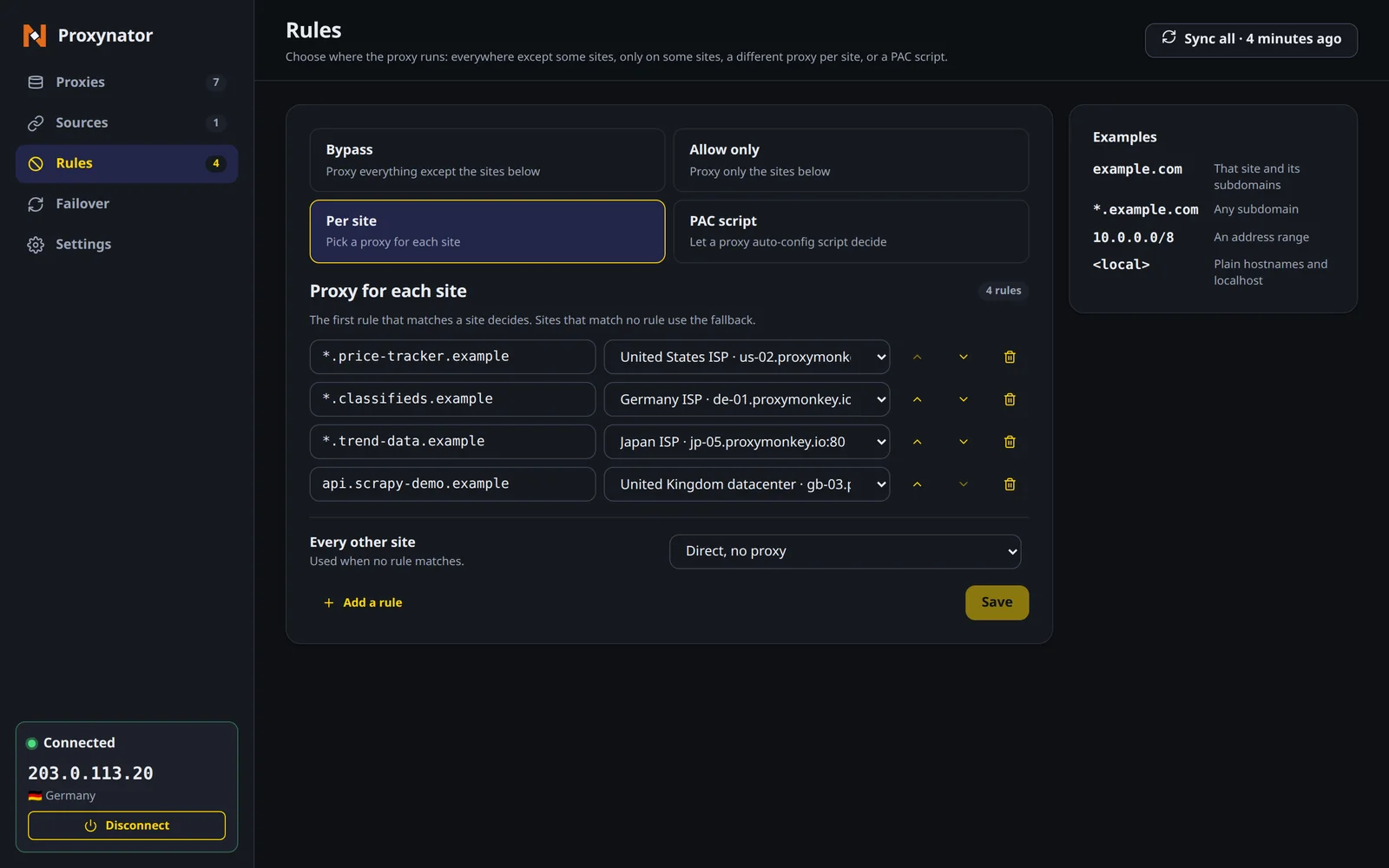
One thing that catches people: the bypass list does not apply in this mode. Only the rules and the fallback decide. So either set the fallback to Direct, no proxy, as in the screenshot, or give your bank its own two rules pointing at Direct, at the top of the list. Turn the mode on from the popup’s routing switch; a rule that says Connected proxy goes direct until a proxy is connected.
Which one to pick
- Proxy most things, keep a few direct: the bypass list.
- Browse as yourself, proxy a few targets: Allow only. Your bank is safe by default.
- Different targets need different exits: Per site, with Direct as the fallback.
Check it, do not trust it
The popup’s big IP is the proxy’s exit, which tells you about the proxied path, not the direct one. To see what a listed site sees, put an IP-echo page on the same list for a minute, for example httpbin.org next to your bank’s lines, and open https://httpbin.org/ip. If it shows your own address, the rule works. Take it off the list afterwards.
Two more things work in your favour. Switch-on-block, the failover feature that swaps proxies when a site answers 403 or 429, never switches for a site you bypass. And the desktop app, ProxyDesk, only carries apps you point at it, so your banking app and a browser you have not pointed at it stay on your own connection.
If the extension is not installed yet, the quick start gets you there. Coming from another extension? The same idea in SwitchyOmega is called auto-switch rules, and the PAC file generator writes it as a PAC file for anything that reads one.
Top-ups start at $5.
One shared datacenter IP for 30 days is $1.25. A single gigabyte of residential is $2.40. The balance never expires.